Assigning Bank Account Number to Customer
The ability to assign a bank account number, to which the customer should make a payment, to the customer.
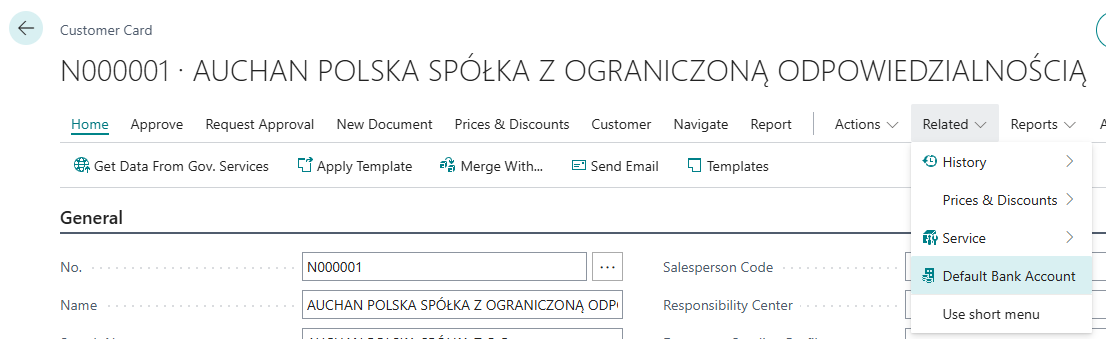
Accounts are assigned in a dedicated view launched from the customer card:
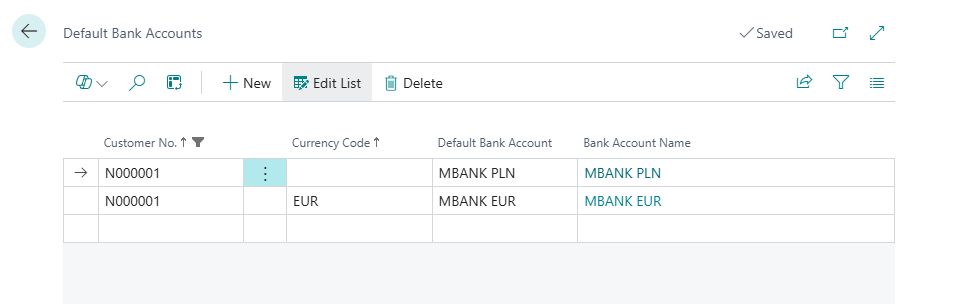
The set information will be assigned in sales and service documents at the moment of:
- selecting the customer,
- selecting the currency code,
To the standard field with the customer's bank code.
📘 Examples and Scenarios
Scenario: Different bank accounts for different customers
Need: A company has several bank accounts in different banks. For Customer A, they want to show the account in Bank X (because the customer has lower transfer fees there), and for Customer B — the account in Bank Y. Standard BC allows setting one default account per currency, but not per customer.
Configuration:
- Open the customer card for Customer A.
- Launch the bank account assignment action.
- Assign: Currency PLN → Bank Account BANKX-PLN.
- Open the customer card for Customer B.
- Assign: Currency PLN → Bank Account BANKY-PLN.
Result: When a salesperson creates an invoice for Customer A, the system automatically inserts BANKX-PLN. For Customer B — BANKY-PLN. Each customer receives an invoice with "their" account number, without manual changes by the salesperson.
Scenario: Multi-currency customer — different account for PLN and EUR
Need: A large customer orders in both PLN and EUR. The company wants PLN invoices to show the PLN account, and EUR invoices to show the currency account. Assignment should work automatically based on the document currency.
Configuration:
- Open the customer card.
- Launch the bank account assignment action.
- Assign:
- Currency PLN (blank) → Bank Account BANK-PLN
- Currency EUR → Bank Account BANK-EUR
Result: When selecting the customer on a sales document, the system inserts BANK-PLN. When the salesperson changes the currency to EUR, the account automatically updates to BANK-EUR. The customer always receives an invoice with the correct account number.
Tip
The bank account also updates when changing the currency code on an existing document — no manual correction needed.