Item By Vendor
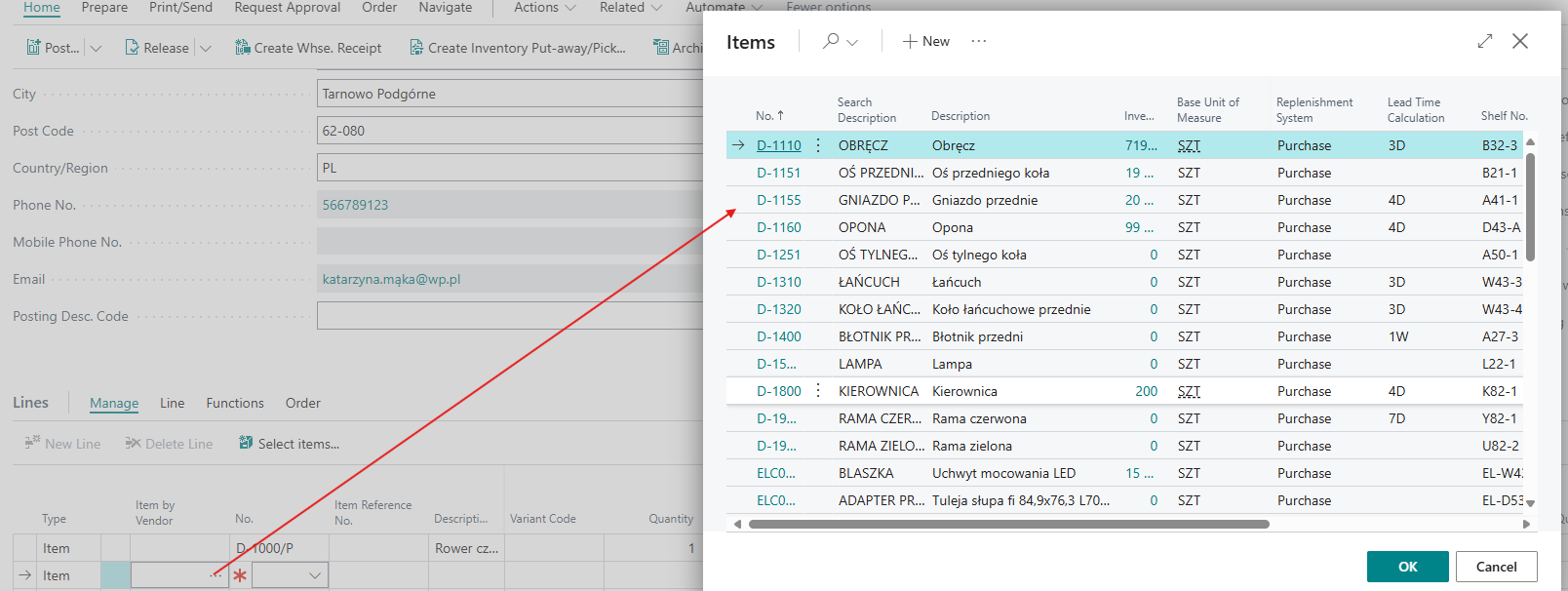
The ability to select an Item No. by vendor in purchase order lines. The Item By Vendor field is hidden by default and needs to be set using personalization. After selecting a value in the new field, the line is always set to Type = Item and the selected Item No., and the additional field is cleared.
📘 Examples and Scenarios
Scenario: Quickly inserting an item on a purchase order without knowing the number
Need: A user is creating a purchase order and wants to add an item but doesn't remember its number in the system. They only know they buy it from this vendor. Instead of searching through all items, they want to choose from a list filtered by vendor.
Steps:
- Open the Purchase Order for the selected vendor.
- In the line, click the Item By Vendor field (enable via personalization if not visible).
- The system shows a list of items associated with this vendor (from the vendor catalog).
- Select the appropriate item from the list.
Result: The line is automatically set to Type = Item and the Item No. is filled in. The user doesn't need to remember internal item numbers — they select from a list limited to the specific vendor.
Tip
The Item By Vendor field is hidden by default. Enable it via page personalization — after one-time configuration, it will be permanently available.