Reverse Transfer Order
❓ Description
The Reverse Transfer Order functionality allows users to quickly reverse a posted transfer receipt back to the source location. This feature simplifies the process by automatically creating a new transfer order that mirrors the original transfer movement.
📋 Page: Posted Transfer Receipt
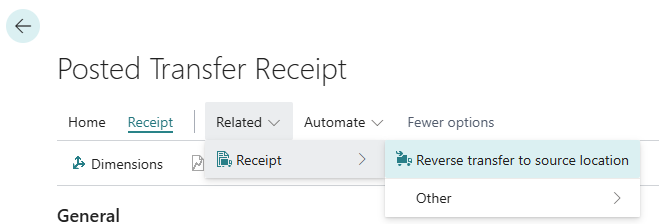
On the Posted Transfer Receipt page, a new action has been added to reverse the transfer back to the source location.
Action: Reverse transfer to source location
Clicking this action automatically creates a new transfer order that reverses the original transfer. All relevant details, such as locations, items, quantities, and other related data, are copied to the new document.
📘 Examples and Scenarios
Scenario: Reversing an accidental transfer
Need: A warehouse worker accidentally transferred 100 pcs of item PROD-200 from location WAREHOUSE-A to WAREHOUSE-B. The transfer has already been posted (received). The goods need to be quickly returned to the source location.
Steps:
- Open Posted Transfer Receipts and find the accidental transfer document.
- Click the Reverse transfer to source location action.
- The system automatically creates a new transfer order: from WAREHOUSE-B to WAREHOUSE-A, 100 pcs PROD-200.
- Release and post the new transfer order.
Result: The goods are back at the source location. The new transfer order has all data copied (items, quantities, in-transit locations) — no need to create it manually.
Tip
The function copies all lines from the original transfer — if you only want to reverse some positions, delete unwanted lines from the new order before posting.