User Setup Enhancement
This module contains a set of features that improve user configuration management in Business Central.
👥 Get All Users
The "N24C | Get All Users" action enables quick addition of all system users to the User Setup list.
How to Use
- Open the User Setup page
- Click the "N24C | Get All Users" action
- Confirm the operation in the displayed dialog box
- The system will automatically add all users who are not yet on the list
- A message will be displayed with the number of users added
Operation Details
- The action retrieves only users who do not have entries in User Setup yet
- Automatically skips users of the following types:
- External User
- Application
- AAD Group
- Agent
- For each added user, the "Register Time" field is set to "Yes"
- After the operation is complete, the list is automatically refreshed
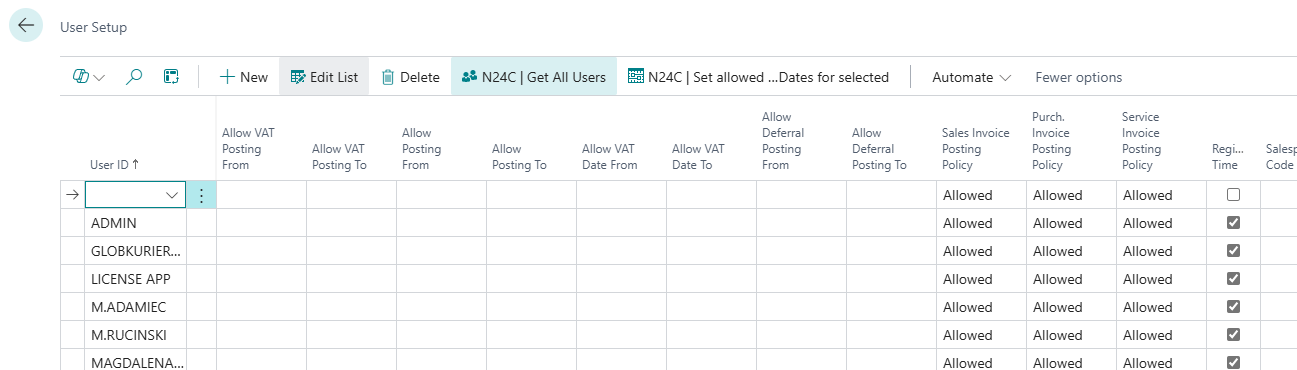
📅 Bulk Change of Allowed Posting Dates
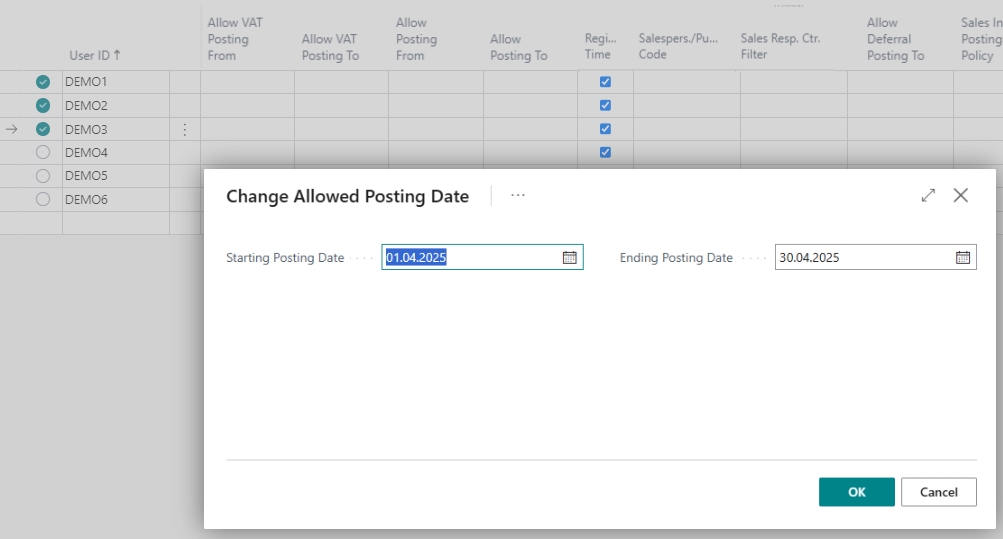
The "N24C | Set allowed Posting Dates for selected" action allows changing the Allowed Posting Dates and Allowed VAT Posting Dates for multiple users at once.
How to Use
- Open the User Setup page
- Select the users for whom you want to change the dates
- Click the "N24C | Set allowed Posting Dates for selected" action
- In the dialog box, set the date range:
- Starting date (Allow Posting From)
- Ending date (Allow Posting To)
- Confirm the operation
- The dates will be updated for all selected users
Default Values
By default, the suggested dates are:
- Start Date - the next day after the current date
- End Date - the last day of the month in which the Start Date falls
📘 Examples and Scenarios
Scenario: Changing allowed posting dates for the whole team at month start
Need: At the beginning of each month, the administrator must change allowed posting dates for 15 users. Manually changing each record takes time.
Steps:
- Open User Setup.
- Select all 15 users (Ctrl+A or select manually).
- Click N24C | Set allowed Posting Dates for selected.
- The system suggests: Start Date = 01.05.2026, End Date = 31.05.2026.
- Confirm — dates are updated for all selected users.
Result: 15 users have updated allowed posting dates in a single operation instead of 15 separate edits.
Scenario: Adding all users to setup after migration
Need: A company just migrated to a new BC environment. There are 40 users in the system, but none of them have entries in User Setup yet. The administrator wants to quickly create entries for everyone.
Steps:
- Open User Setup.
- Click N24C | Get All Users.
- Confirm the operation.
- The system adds 40 users (skipping system accounts, applications, and AAD groups).
Result: All business users have entries in User Setup. The administrator can now bulk-set posting dates for them, and the system automatically enabled time registration.
Tip
The system automatically skips Application, External, and Agent user types — no need to manually remove them from the list.