Production Journal
The Production Journal module automates data suggestions and checks entry completeness, reducing reporting errors.
❓ Introduction
The module supports daily Production Journal entry and validates dependencies between operation data.
🔍 How it works
Change Status for Selected Production Orders
In the "Change Production Order Status" view, a new action has been added that allows changing the status only for the selected production orders.
Production Journal Data Validation
Additional data validation is performed while filling out the Production Journal.
When filling in Stop Code and Stop Time, the system checks if:
- Run Time is empty
- Output Quantity is empty
- Setup Time is empty
- Scrap Code and Scrap Quantity are empty
When filling in Scrap Code and Scrap Quantity, the system checks if:
- Setup Time is empty
- Stop Time and Stop Code are empty
When filling in Stop Code, the system checks if:
- Run Time is empty
- Output Quantity is empty
- Stop Time and Stop Code are empty
- Scrap Code and Scrap Quantity are empty
When filling in Run Time and Output Quantity, the system checks if:
- Setup Time is empty
- Stop Time and Stop Code are empty
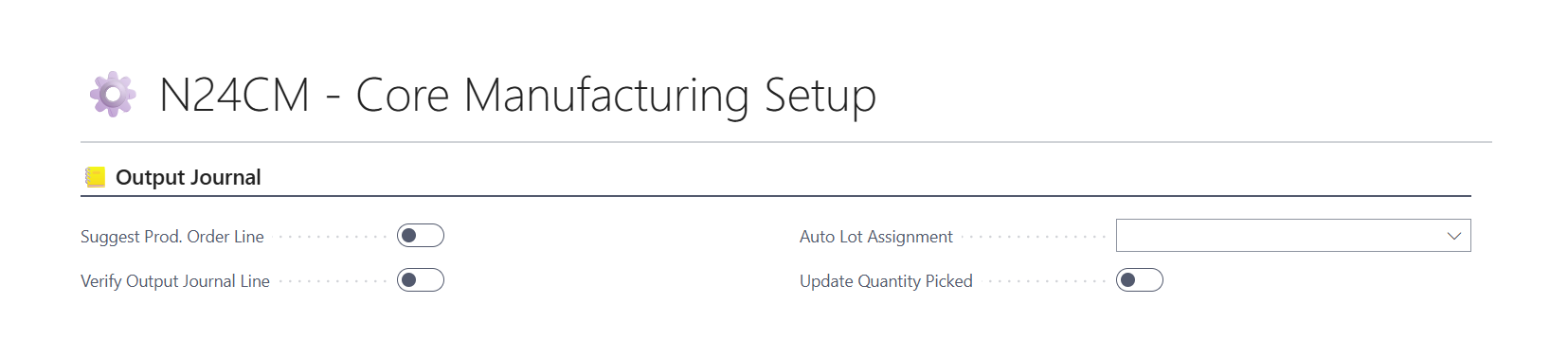
Validation can be enabled or disabled in ⚙️ N24CM - Core Manufacturing Setup.
Suggest Production Order Line for Single-Line Orders
When entering the Prod. Order No. in the Production Journal, the system will automatically suggest the remaining data if the Production Order contains only one line. This feature must be enabled in ⚙️ N24CM - Core Manufacturing Setup.
Production Order No. as Lot No.
When creating reservation entries, the system assigns the Production Order number as the Lot No.. This option can be enabled in ⚙️ N24CM - Core Manufacturing Setup.
Update Quantity Picked with WMS
The system updates the Qty. Picked value in the Production Order component lines. This option can be enabled in ⚙️ N24CM - Core Manufacturing Setup.
🚀 How to enable the module
- Open N24CM - Core Manufacturing Setup.
- Enable the required Production Journal options.
- Save the setup.