G/L Settings
General Ledger Setup defines the re-posting direction, balance account, and dimension rules.
⚙️ Cost re-posting setup
In General Ledger Setup, complete the Additional costs section:
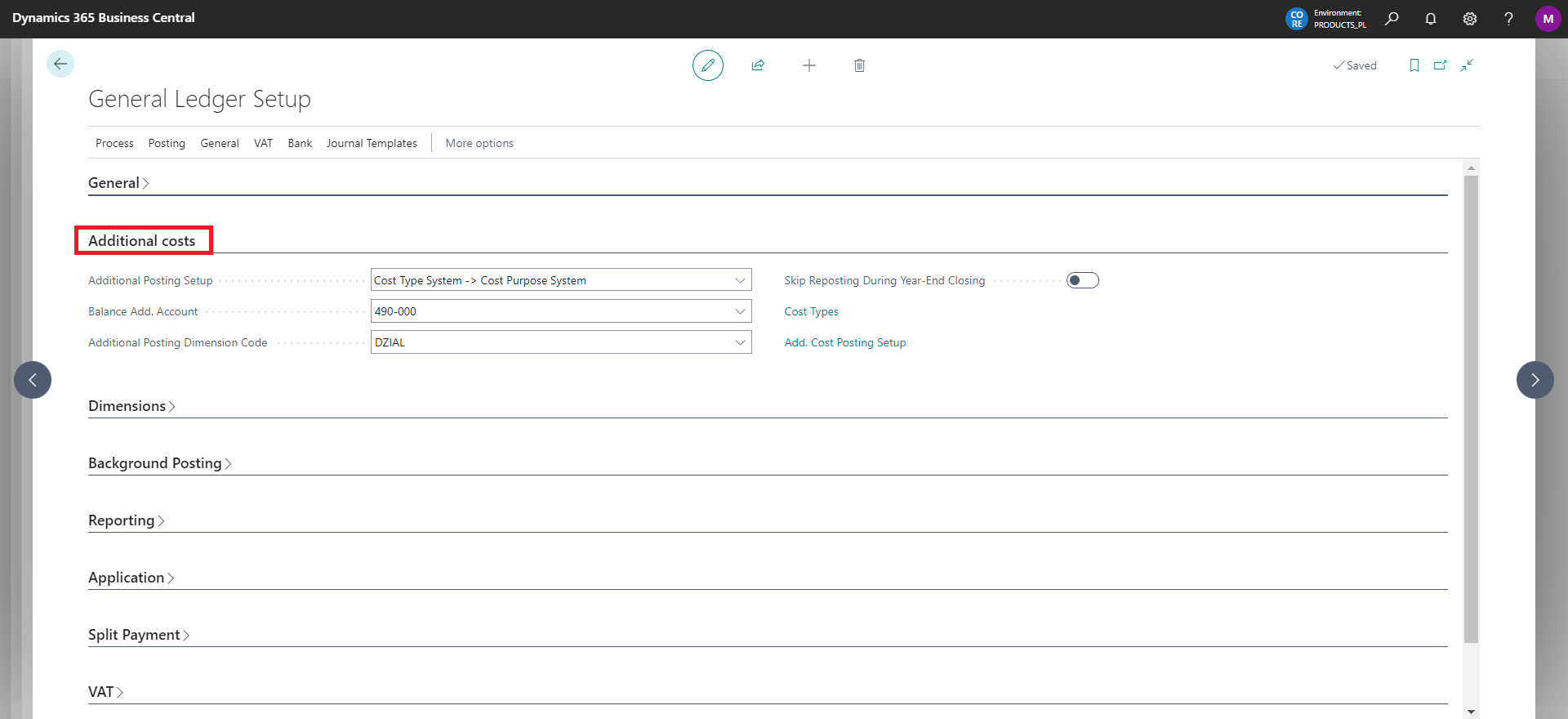
📋 Cost re-posting fields
| Field | Description |
|---|---|
| Settings for additional cost accounting | Select Cost Type System -> Cost Purpose System when posting to group 4 accounts and re-posting to group 5 accounts, or Cost Purpose System -> Cost Type System for the reverse direction. |
| Balance Add. Account | Specify the account used for re-posting, most often account 490 with the appropriate analysis. |
| Additional Posting Dimension Code | Complete this field when you use a Dimension for re-posting. |
| Skip Reposting During Year-End Closing | Select the appropriate option for year-end closing. |
🔗 Quick access
The General Ledger Setup page also has two fields that provide quick access to pages:
Cost Types - in case no cost type has been defined yet, the line description changes to: No Cost Types. You must define them..
Add. Cost Posting Setup.
Warning
If you use a Dimension for re-posting, set it as mandatory on the account card.

The assigned dimension must have at least one value set on the Dimensions page from the Dimension Values action.
