Promo Fund Setup
Configure how the deduction is calculated and posted, together with the statements printed on the RR invoice.
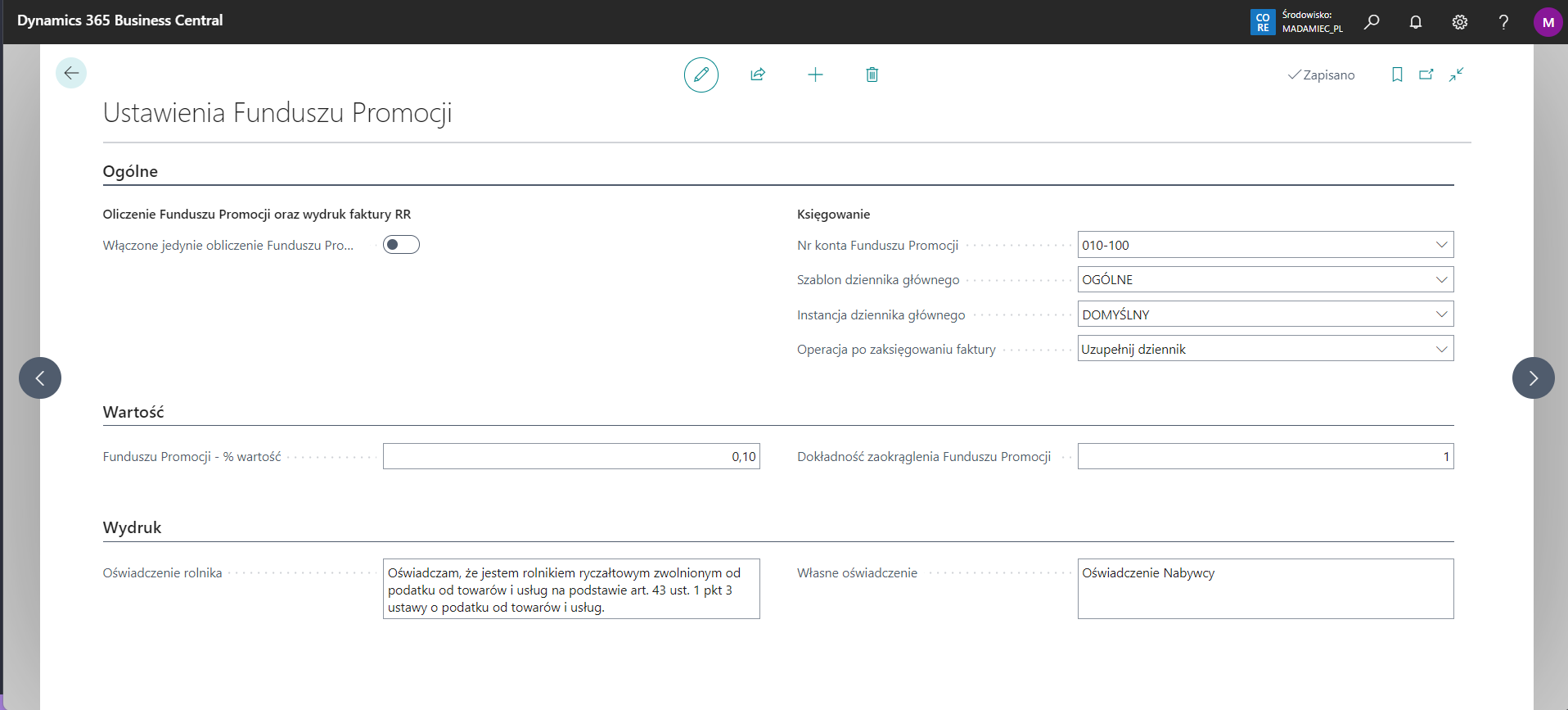
The Promo Fund solution can work in two modes:
- calculation of the Promo Fund amount and printing of the RR invoice only; no additional entries are created beyond the standard purchase invoice posting process, regardless of whether the supplier is a farmer;
- the extended mode, which also posts the deducted Promo Fund amount.
The active mode is controlled by Enable only Promo Fund calculation and RR invoice printing.
- Promo Fund Account No. — account to which the Promo Fund amount is posted.
- General Journal Template / General Journal Batch — define the journal used to reduce the supplier balance and transfer the amount to Promo Fund Account No.
- Operation after invoice posting — determines whether the journal entry is created for manual posting or posted automatically.
- Promo Fund % Value — percentage calculated from the net purchase invoice value.
- Promo Fund Rounding Precision — defines how the Promo Fund amount is rounded.
- Farmer Statement — statement printed on the RR invoice.
- Own Statement — your own statement printed on the RR invoice.