Breaks
Automatically deduct planned breaks from recorded work time to improve payroll accuracy and give supervisors reliable productivity data.
The Breaks module allows you to define break schedules and automatically deduct break time from recorded work time in production entries. This ensures that net work time is calculated precisely, without requiring operators to manually correct entries.
❓ What does the module do?
When the module is enabled, the system:
- Allows you to define a break schedule with specific start and end times.
- Automatically detects which breaks overlap with the production entry time.
- Deducts break time from work time (
Runtime), calculating net time. - Stores information about applied deductions and break details in each production entry.
⚙️ How It Works
Break Schedule
The Break Schedule (Break Schedules) is a list of defined breaks applicable in the facility. Each break contains:
| Field | Description |
|---|---|
| Code | Unique break identifier |
| Name | Friendly break name (e.g., "Breakfast", "Lunch", "Night Break") |
| Start Time | Break start time |
| End Time | Break end time |
| Active | Determines whether the break is applied in calculations |
Note
Only breaks marked as Active are considered when deducting time.
Deduction Mechanism
The system calculates break deductions as follows:
- For each production entry, it retrieves the operation start and end times.
- Checks all active breaks in the schedule.
- Calculates the overlap between break time and operation time.
- Sums the time of all overlapping breaks.
- Deducts the total break time from work time.
Example
Operation: 06:00 - 14:00
| Break | Time | Overlap |
|---|---|---|
| Breakfast | 09:00 - 09:15 | 15 min ✓ |
| Lunch | 12:00 - 12:30 | 30 min ✓ |
| Night Break | 02:00 - 02:15 | 0 min ✗ (outside range) |
Gross time: 480 min (8 hrs)
Break deduction: 45 min
Net time: 435 min (7 hrs 15 min)
Production Entry Fields
After processing breaks, the system populates the following fields in the production entry:
- Gross Runtime — gross time (full time from start to end)
- Runtime — net time (after break deduction)
- Break Deducted — flag indicating that breaks have been deducted
- Break Details — details of applied breaks (e.g., "Breakfast (09:00 - 09:15); Lunch (12:00 - 12:30)")
Night Shift Handling
The module correctly handles operations crossing midnight. If an operation runs from e.g., 22:00 to 06:00, the system checks the break schedule for each day separately, ensuring correct calculations.
📌 Requirements
The module requires activation in the solution settings.
How to enable the module?
Each module can be enabled or disabled at any time for any of your companies. Disabling a module hides all interface elements added by it. When a module is disabled, its functions become unavailable to users.
To enable a module
- Go to the N24SF - Shop Floor Setup page.
- Open the information panel on the right, where you'll find the
Modulessection.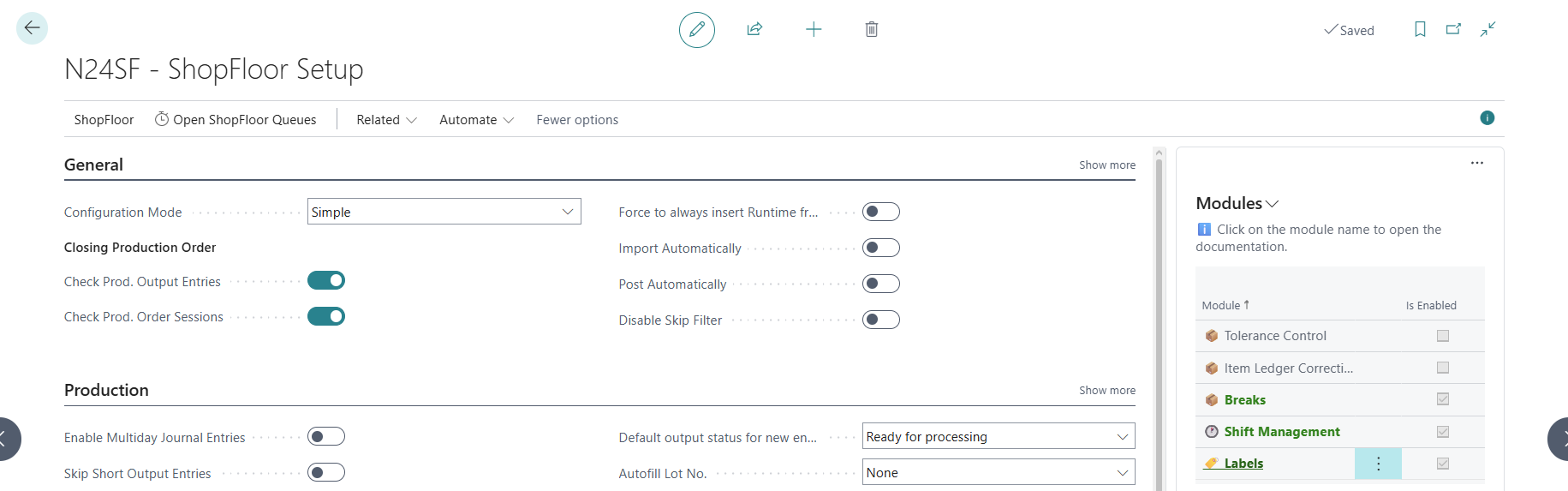
- Select any module from the list, then click
 .
. - From the action menu, select
Enable.
Additional information
- A module can be disabled in a similar way, using the action menu.
- Clicking on a module name will redirect you to the module's documentation page.