Labels
Labels module auto-creates and prints production labels from entry data using N24 Labels extension. Records print history with label ID, date, and user.
The Labels module (Labels) extends Shop Floor with label support for production entries. It enables creating and printing labels based on production entry data and directly from the operator's workstation. The module integrates with the N24 Labels extension, which is required for its operation.
❓ What does the module do?
When the module is enabled, the system:
- Creates a label based on production entry data (including item number, description, variant, batch/serial, quantity).
- Completes the label data with information from the item card (e.g., GTIN, net/gross weight, unit of measure).
- Automatically prints labels during production entry registration.
- Enables manual label printing for a specific entry from the operator's workstation.
- Records the history of the last label print in the production entry (label ID, date/time, user).
🔗 Dependency on product
For the module to work, the following extension must be installed and published in the environment:
If the extension is not available, the system will block module activation and display a message about the required product installation.
🔓 How to enable the module?
Each module can be enabled or disabled at any time for any of your companies. Disabling a module hides all interface elements added by it. When a module is disabled, its functions become unavailable to users.
To enable a module
- Go to the N24SF - Shop Floor Setup page.
- Open the information panel on the right, where you'll find the
Modulessection.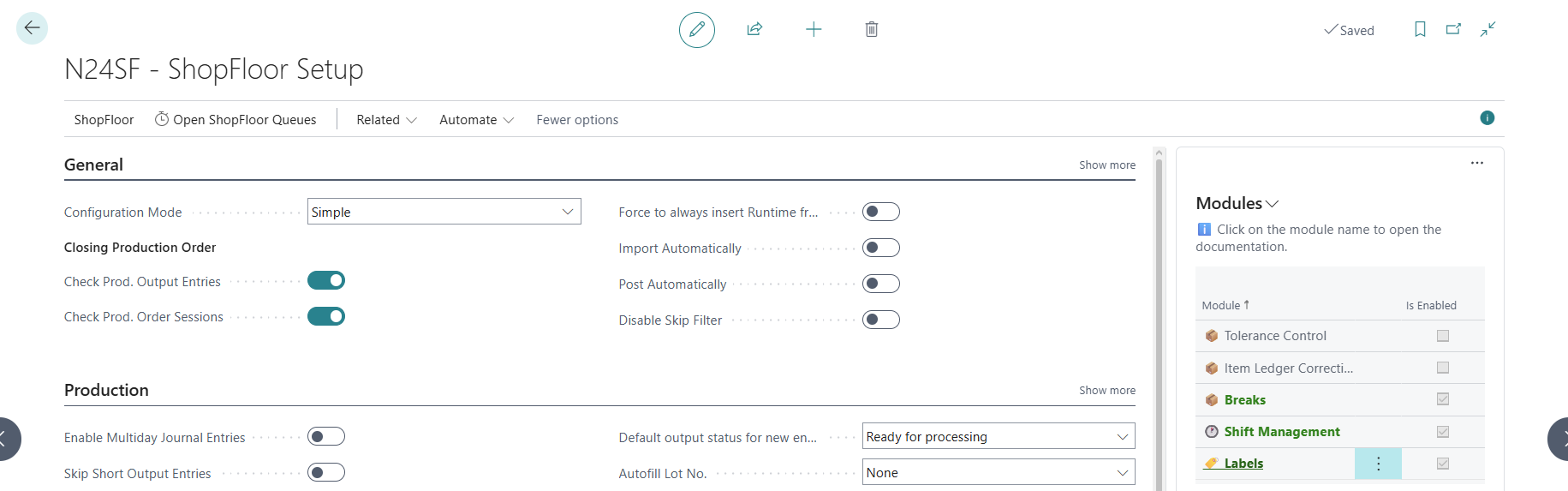
- Select any module from the list, then click
 .
. - From the action menu, select
Enable.
Additional information
- A module can be disabled in a similar way, using the action menu.
- Clicking on a module name will redirect you to the module's documentation page.