Production Employee Assignment
Device-to-center assignments strengthen registration control, improve accountability and protect data quality on the shop floor.
Production Employee Assignment is a feature that enables managing relationships between Shop Floor devices (tablets) and production resources (employees, machines) in the system. This functionality is key for effective production process management and work monitoring.
⚙️ Operation Concept
The system is based on three main elements:
- Device - tablet or other device with installed Shop Floor, where employees register operations
- Employee - work center, machine center, or resource representing an employee or machine in the system
Operation Model
In practice, the system can be used in two ways:
Employee Work Registration:
- Employees are defined in the system as work centers or machine centers
- Each device (tablet) is assigned to specific centers
- This allows limiting usage to authorized employees only
Machine Operation Control:
- Devices can be assigned to actual production machines
- This allows limiting registration only to operations performed on a given machine
📋 Production Line Employees Page
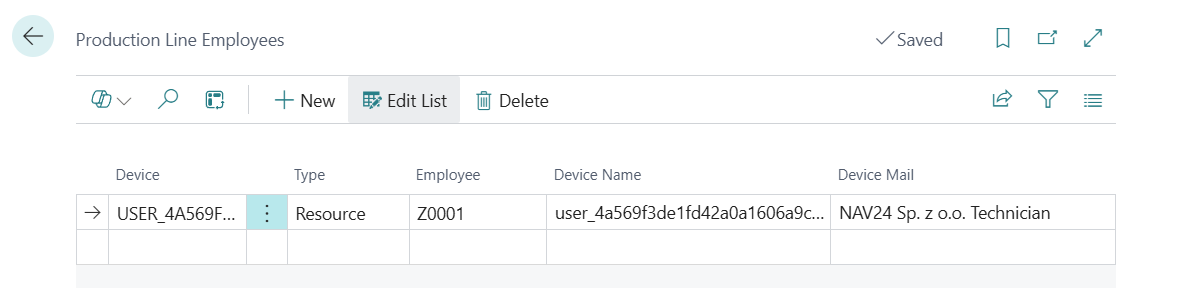
The Production Line Employees page contains the following elements through which employees can be assigned to production lines:
Main Fields
- Device - tablet identifier or other device/user with Shop Floor
- Type - specifies the production resource type:
- Work Center - often used to represent an employee
- Machine Center - can represent an employee or machine
- Resource - additional production resource type
- Employee - identifier of center/resource (employee/machine) to be assigned to the device
Additional Fields (available in personalization)
- Device Name - friendly device name (e.g., "Tablet Hall 1")
- Device Email - email address used for system communication
Device Assignment
Devices can be assigned to employees or resources in two ways:
- Through the Production Line Employees page - described above
- Directly from work/machine center card - using "Assign Device" action, which opens device assignment page for selected center
🎯 Application
The production line employee assignment system can be used for:
- Defining permissions for operation registration on specific devices
- Work organization through employee assignment to specific stations
- Access control to production functions
- Facilitating employee work booking and analysis
Shop Floor Panel
The Shop Floor Panel uses these assignments for:
- Determining available operations on a given device
- Interpreting data according to individual client arrangements
- Validating operation registration permissions
📌 Notes
- One device can be assigned to multiple production resources
- The system is flexible and can be adapted to different work organization models
- Proper configuration is key for correct operation
- Assignments can be modified over time depending on organization needs
🧠 Additional Employee-Related Functionalities
👤 Employee Card
A new Shop Floor group has been added to the employee card containing:
- Employee Supervisor - supervisor code used for leave requests through Shop Floor
- Supervisor Email - supervisor email used for system communication
- Production Employee - determines if employee is a production employee
- Type - specifies employee type (Work Center/Machine Center/Resource)
- No. - related type number
- QR Code - unique employee QR code for quick identification
- PIN - employee PIN code for Shop Floor authorization
👥 Employee List
Fields supporting Shop Floor have been added to the employee list. Available in personalization:
- Supervisor
- Supervisor Email
- QR Code
- PIN