Production Settlement for Production Orders
This page describes the monthly settlement of production capacity cost variances to released and finished production orders.
❓ Introduction
The Production Settlement for Production Orders module distributes a specified cost amount across orders based on their production capacity costs. This helps you adjust the cost of semi-finished and finished goods and assess profitability using costs from the selected period.
🔍 How it works
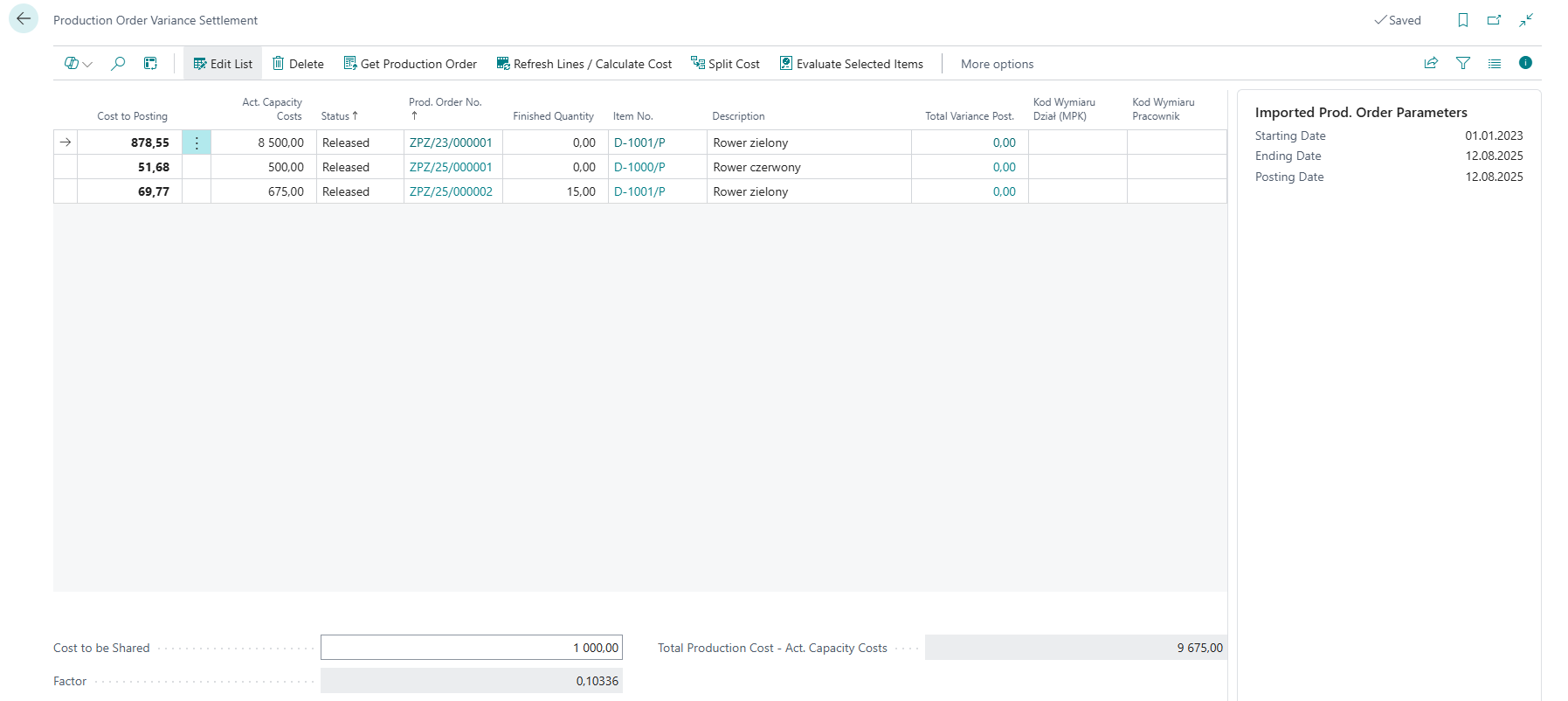
The system retrieves production orders with production value entries posted in the selected period. It then calculates production capacity costs, calculates a distribution factor, and distributes the specified amount. When product types are enabled, you can settle cost types identified by reason codes separately, such as energy or leasing.
- Retrieve orders — select a date range and posting date. You can also limit the results by Location Code.
- Calculate the distribution basis — after you use Refresh Lines / Calculate Costs, the module totals the production capacity costs in the retrieved lines.
- Calculate the factor — enter the balance to distribute in Variance Amount to Settle. The module divides the amount by the total production capacity cost.
- Split the cost — use Split Cost to Orders to populate Cost to Posting proportionally for each line.
- Post variances — use Revalue Selected Orders to post the selected lines. The result depends on the Variance Posting Method setting.
For example, if total production capacity costs are 100,000 USD and the variance amount is 4,000 USD, the factor is 0.04. A line with a cost of 25,000 USD receives 1,000 USD to post.
🚀 How to enable the module
- Go to Search and enter Production Variance Settlement Setup.
- Open the settings page and complete the required fields described in Settings.
- Save the settings.
🧾 How to use
Periodic settlement process
Go to Production Variance Settlement for Production Orders and perform the actions in sequence.
Get production orders:
- Click Get Production Orders.
- Enter Starting Date and Ending Date for the settlement period.
- Set the Posting Date to use for the variance posting.
- Optionally select Location Code to limit the retrieved orders.
Calculate current amounts
- Click Refresh Lines / Calculate Costs action
- System will recalculate all amounts posted so far for displayed orders
Enter the variance amount:
- Enter the amount to distribute in Variance Amount to Settle. When automatic G/L account suggestion is enabled, the module can suggest the balance of the configured account as of the period ending date.
- Check the calculated factor and the total Cost to Posting.
Distribute costs to orders:
- Use Split Cost to Orders.
- The module populates Cost to Posting proportionally to production capacity costs.
Post the settlement:
- Select the lines and click Revalue Selected Orders.
- With Revaluation, the module creates an operation entry at the variance work center for a released order and revalues output from a finished order.
- With Insert Value Entry, the module creates a capacity ledger entry and a direct-cost value entry for each selected line.
- The entries created by the module are marked as Production Variance. When product types are used, the module also transfers the selected reason code to the posting.
📌 Examples and scenarios
Scenario: Settling energy costs for a product group
Need: A company wants to distribute its monthly energy cost only across orders for a selected product group and retain information that the settled amount relates to energy.
Setup:
- Create the ENERGY reason code and select its Deviation field.
- In Product Type Settings, combine the product type, the ENERGY code, and a cost work center.
- In the worksheet, retrieve orders for that product type and reason code, enter the amount to distribute, then split and post the cost.
Result: The module distributes the cost proportionally across the retrieved orders. Settlement entries retain the ENERGY reason code, making this cost type easier to analyze.