Production Variance Settings
This page describes the settings required to distribute and post production capacity cost variances.
⚙️ Module settings
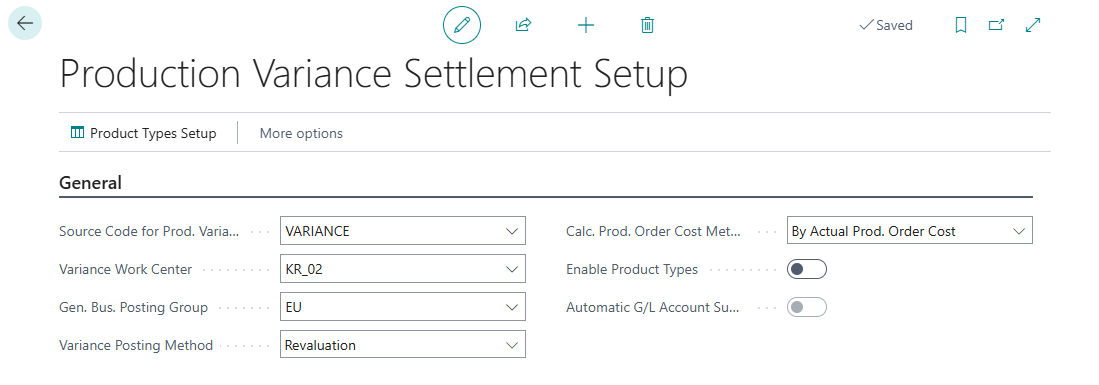
Go to Search → Production Variance Settlement Setup and complete the fields:
| Field | Description |
|---|---|
| Source Code for Production Variances | Source code that identifies entries created by the variance settlement. Create a source code for variances before selecting it. |
| Variance Work Center | Work center used for entries created for released production orders. The work center must have the inventory posting group for variances. |
| Gen. Bus. Posting Group | General business posting group used for variance posting. |
| Variance Posting Method | Select Revaluation or Insert Value Entry. The selection determines how the distributed amount is posted. |
| Calculate Production Order Cost Method | Determines the basis used to calculate costs for retrieved orders. |
| Include Capacity Overhead | Specifies whether capacity overhead is included in the cost used by the settlement. |
| Time Used Unit of Measure | Select a time unit when using the calculation method based on time used. |
| Enable Product Types | Enables selection of product type and reason code when retrieving orders. See Product Type Settings. |
| Automatic G/L Account Suggestion | Enables a suggested amount to distribute based on the balance as of the period ending date for the G/L account set for the selected product type and reason code. This field is available after you enable product types. |
🧾 Posting setup
Before the first settlement, check the standard production posting setup:
- In Inventory Posting Setup, complete WIP Account and Inventory Account for inventory posting groups and locations used by components and output items.
- For production operations, complete WIP Account for the output item's inventory posting group and a blank location code.
- In Manufacturing Setup, set the general business posting group that is copied to the production order header.
- In General Posting Setup, assign the direct cost applied account for the combination of the production order's general business posting group and the work center's general product posting group.
- For the variance general business posting group and general product posting group, complete the inventory adjustment account.
🔧 Variance work center
Create a work center for variance settlement and assign it the variance general product posting group. Then select its number in Variance Work Center. This lets the module post a variance to a released production order.
💡 Suggesting the amount to distribute
After enabling Product Types and Automatic G/L Account Suggestion, assign a G/L account to the product type and reason code combination. After you retrieve orders, the module suggests the account balance as of the selected period ending date in Variance Amount to Settle. Review the amount before splitting it because the balance includes entries posted up to that date.
🔗 Related articles